I have been using two phones till date – Motorola Razr and Nokia e71. Both the phones had its own contact list with a slight overlap. So when i recently bought Samsung c5212 dual sim phone I was left stranded when i tried to import the contacts using the Samsung PC Suite. Samsung reads only .nbf, .lef, .WAB, .csv or .vcf [vCard ] files.
I had taken backup of my nokia e71 through the Nokia PC Suite and it had stored files in the .nbu [nokia back up] format. I tried searching for some application which would convert .nbu files to the one Samsung supported. The closest application is Noki soft but the free version allows you to export just 50 contacts! The full version is available for $49.5.

I hit bullseye with Nokia NbuExplorer which is available for free! It reads .nbu files and picks up all contacts as well as SMS’s! You can store either one or the entire contact list in .vcf format which you can later easily export it to Samsung phone.
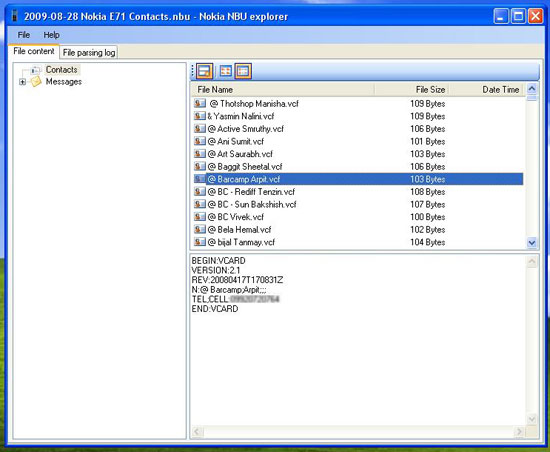
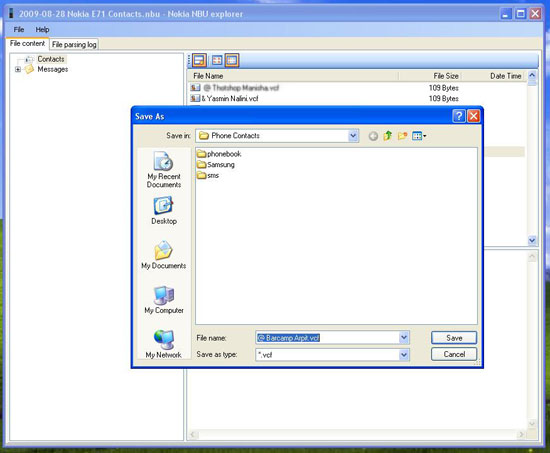

In a couple of minutes i was able to convert all my contacts to .vcf file format and import it to my Samsung phone. It took me a couple of hours hunting for the right software and a couple of minutes to transfer the contacts…
Hope this helps whoever has bought a samsung phone and wants to import his contacts from .nbu file.
Cheers.
<br />

56 responses so far ↓
1 ricky // May 10, 2012 at 12:32 am
hi i am using motorazr v3,bought a new cell samsung primo
now want to transfer contacts from motorazr to samsung. and i am using vista os .i do not have any pc suite cd with me .and through net it’s giving error while downloading pc suite.
need some help
2 Tarun // Jun 24, 2012 at 5:16 pm
Hi Kunal ,
Please Tell me way out to convert .VCF file to .NBU.
As i have taken backup of my Mobile directly in my PC by copying it. SO it saved in .VCF extention but while uploading it through PC Suite it is asking .NBU extention.Please Help
3 Muhammad Ashfaq // Jul 10, 2012 at 11:43 pm
thanks a lot, I transferred my contacts to new Samsung
4 suraj // Aug 25, 2012 at 5:40 pm
thanks a lot dear………………….nice advice
5 mahdieh // Aug 30, 2012 at 12:28 am
thanks man it work!
6 Roberto A. Dantas // Jan 23, 2013 at 7:15 am
Thanks a lot Kunal. I finally could transfer my contacts to the Nexus 4 with the nbu converter and your help.
Leave a Comment